A forward contract is an agreement to buy a set number of bushels from a farmer at a set price, delivered during a set window. Horizon Grain counts each load against the contract as it closes, so you can always see how much has come in and how much is still owed.
This page covers flat-price contracts, where the price per bushel is fixed when the contract is signed. For contracts where part of the price is set later, see Basis and HTA contracts.
How a contract moves along
Every contract card on the Contracts page shows a status badge:
- Open — entered but not yet in force. You can still edit it. Loads can’t be put on it yet.
- Active — signed and on file. It shows up on the scale page so loads can be put on it.
- Settled — paid out. The settlement invoice has been created.
- Cancelled — called off before any grain was delivered against it.
Create a contract
- Click Contracts in the menu, then New Contract.
- Leave Contract Type on Flat Price.
- Enter the Contract Number from your paper copy, so the two are easy to match up later.
- Fill in Customer, Commodity, Bushels, Flat Price ($/bu), and Delivery Window Start. These are required.
- Add a Delivery Window End, Signed Date, and Notes if you have them.
- Click Create Contract. The new contract shows as Open.
While a contract is open you can change it with Edit on its card. The commodity and contract type can’t be changed once the contract is created.
Activate it
Once the paper contract is signed, click Activate on its card and confirm. The contract is now Active and can no longer be edited.
Put loads on the contract
- Enter the load on the Scale page as usual.
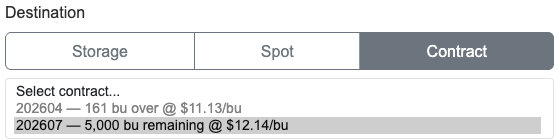
- Pick the customer and commodity, then under Destination choose Contract.
- Choose the contract from the list. Each one shows how many bushels are left and its price.
- When the load is finished, click Close. The dry bushels count toward the contract.
The Fulfilled line on the contract card shows bushels delivered out of bushels contracted, for example 17,400 / 20,000 bu.
Settle it
- On the contract card, click Settle.
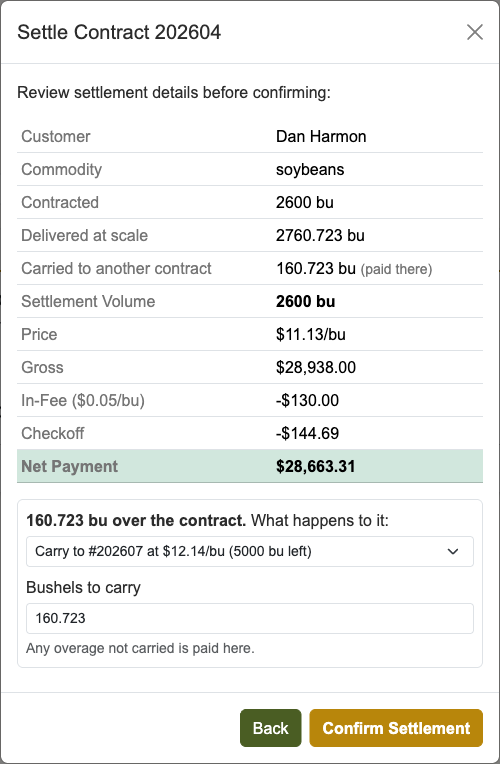
- Check the preview: bushels contracted and delivered, price, gross, any in-fee and checkoff deductions, and the Net Payment. If the farmer came up short, a Short by line shows how many bushels.
- If more came in than the contract called for, pick what happens to the extra. See When a contract comes in over.
- Click Confirm Settlement.
The contract changes to Settled, and the settlement invoice appears on the customer’s Invoices tab, where you can print it.
Cancel a contract
Click Cancel on an open or active card, type a reason, and click Cancel Contract. The reason shows on the card. You can only cancel a contract that has no grain against it.
Common questions
- The contract isn’t in the list on the scale page. Only active contracts for that customer and commodity show up, and only until their Delivery Window End date has passed. Check the status, the customer, and the end date.
- The fulfilled count didn’t change. A load counts once it is closed. Open loads don’t count yet.
- A load went on the wrong contract. While the load is still open, click Edit, choose the right contract, and click Save. Once a contract load is closed it can’t be reopened, so check before you close.
- A split load can’t go on a contract. A load split between customers has to go to storage or be sold at the scale.
- The farmer came up short. You can’t cancel a contract that has grain against it. Settle it instead: settlement pays for what was delivered and closes out the rest.
- The farmer wants to sell grain he already has in storage on the contract. Use Apply to Contract when selling from storage. See Apply stored grain to a contract.
- A settlement was wrong. Click Re-open on the settled card. The settlement invoice is deleted, drying or storage deducted on it goes back to unpaid, and the contract goes back to Active, so you can fix it and settle again. You can’t re-open it if the settlement is already marked paid; re-open the payment on the customer’s Invoices tab first.
- Grain on a contract doesn’t show in the farmer’s storage. That’s expected. Once a load on a contract closes, the grain belongs to the elevator and isn’t charged storage.