Before you start The contract must be Active and priced, for the same farmer and grain, with bushels left on it. Flat-price contracts are priced when signed; a basis or Hedge-to-Arrive contract needs its open part set first (Price on the contract card). The farmer needs the grain in storage.
Apply stored grain
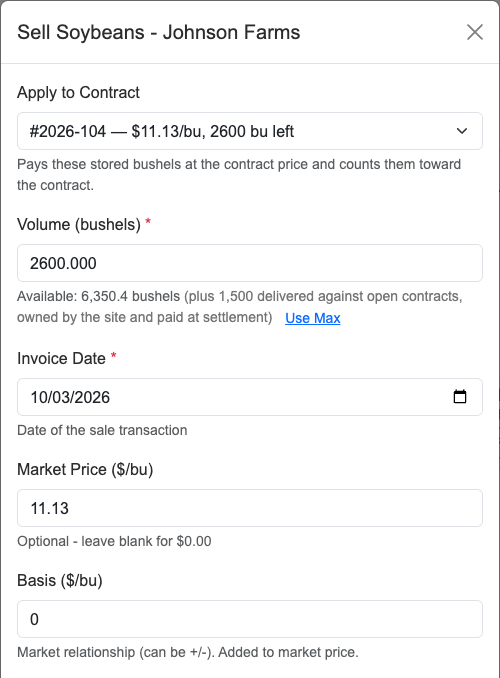
- Go to Customer Balances and find the farmer.
- Click Sell Soybeans (or Sell Corn, or whichever grain).
- In Apply to Contract at the top, pick the contract. Each one shows its price and bushels left. Leave it on None (spot sale) for an ordinary sale.
- Check what filled in. Market Price ($/bu) and Basis ($/bu) come from the contract and lock: for a flat-price contract, the contract price and a basis of 0; for a basis or HTA contract, its futures price and its basis. Contract # is the contract number.
- Check Volume (bushels). It defaults to what is left on the contract, or the farmer’s storage balance if that is smaller. Lower it for a partial sale; apply the rest later with another sale.
- Fill in the rest as you would for any sale from storage, then click Create Invoice.
What happens next
The bushels come out of the farmer’s storage balance and are paid on this sale at the contract price. On the Contracts page, the contract card’s Fulfilled line counts them along with any loads weighed against the contract at the scale.
Settling a contract that has stored grain on it
Click Settle on the contract card. The window lists Delivered at scale and Applied from storage separately. The settlement pays only the scale bushels, because the stored bushels were already paid on their own sales.
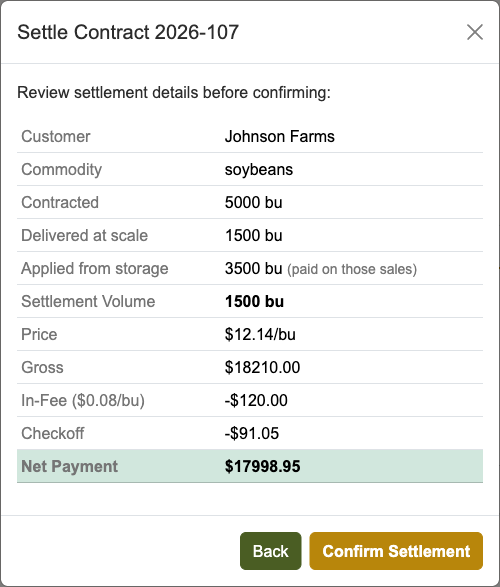
If every bushel came from storage, the button reads Close Contract instead of Confirm Settlement. It closes the contract with no new invoice.
Common problems
- No Apply to Contract list. It only appears when the farmer has an Active, priced contract for that grain with bushels left. Check the contract on the Contracts page: activate it, or price it if it shows Unpriced.
- A contract is greyed out. The reason is shown next to it. A basis or Hedge-to-Arrive contract shows futures price not set yet or basis not set yet until it is priced; click Price on the contract card, then open the sale again. Contracts with nothing left show already filled.
- “Volume exceeds the … bu left on contract.” You can’t apply more than is left. Sell the extra as a separate spot sale or leave it in storage.
- Editing the sale later. Price, basis, and contract number stay locked, and the bushels can’t go above what is left on the contract. Once the contract is settled, re-open it on the Contracts page before changing the bushels.
- Can’t cancel the contract. A contract with grain on it can’t be cancelled. Settle it instead.
- Backdated sale refused. A sale dated in the past can’t be for more grain than the farmer held at the end of that day. Date it on or after the delivery.