The spreadsheet that lied.
Picture this. It is October. Corn harvest is running hard — 20% moisture grain, trucks lined up at the scale, the dryer running around the clock. You have got fourteen open forward contracts signed between July and September. Six different farmers, three different delivery windows, prices ranging from $4.50 to $5.40 a bushel. You wrote every one of them on your standard contract form, filed a copy in the drawer, and told yourself you would keep track in a spreadsheet.
Three weeks into harvest, a farmer calls to say he is done hauling. You pull the spreadsheet. Somewhere between updating it after a load came in at 7 PM and fixing a formula error someone introduced, the numbers do not add up. Did Johnson haul 18,500 bu or 19,200? The contract said 20,000. Is he short? Is he done? You are not sure, and now there is an awkward conversation ahead of you — the kind where you are recounting scale tickets while he is waiting on a check.
What fulfillment tracking actually requires.
- Under-delivery risk. A contract expires without being filled. The farmer short-hauled, but you did not see it coming — so you never had the conversation about making it up or releasing the remaining bu. Now you are chasing it after the fact.
- Over-delivery confusion. A farmer hauls more than the contract calls for. What price does the overage go at — contract price, spot, or something else? If you did not see it coming, you might not catch it until you try to settle.
- Wrong contract assignment. A load gets entered against the wrong contract, or left in the customer's storage account when it should have gone to a contract. The bushel counts drift silently until someone reconciles manually.
- Settlement blind spots. You go to close out a contract and realize you do not know with confidence whether it is fully hauled in. Counting back through the scale tickets at settlement is the worst possible use of time at the end of a long harvest.
How Horizon Grain handles it.
When a load comes in and gets entered against a forward contract, Horizon Grain immediately updates that contract's fulfilled bu count. No manual entry in a second place. No spreadsheet formula to maintain. The count is derived directly from the delivery records — which means it is always current, always accurate, and it recalculates automatically if a ticket is ever corrected.
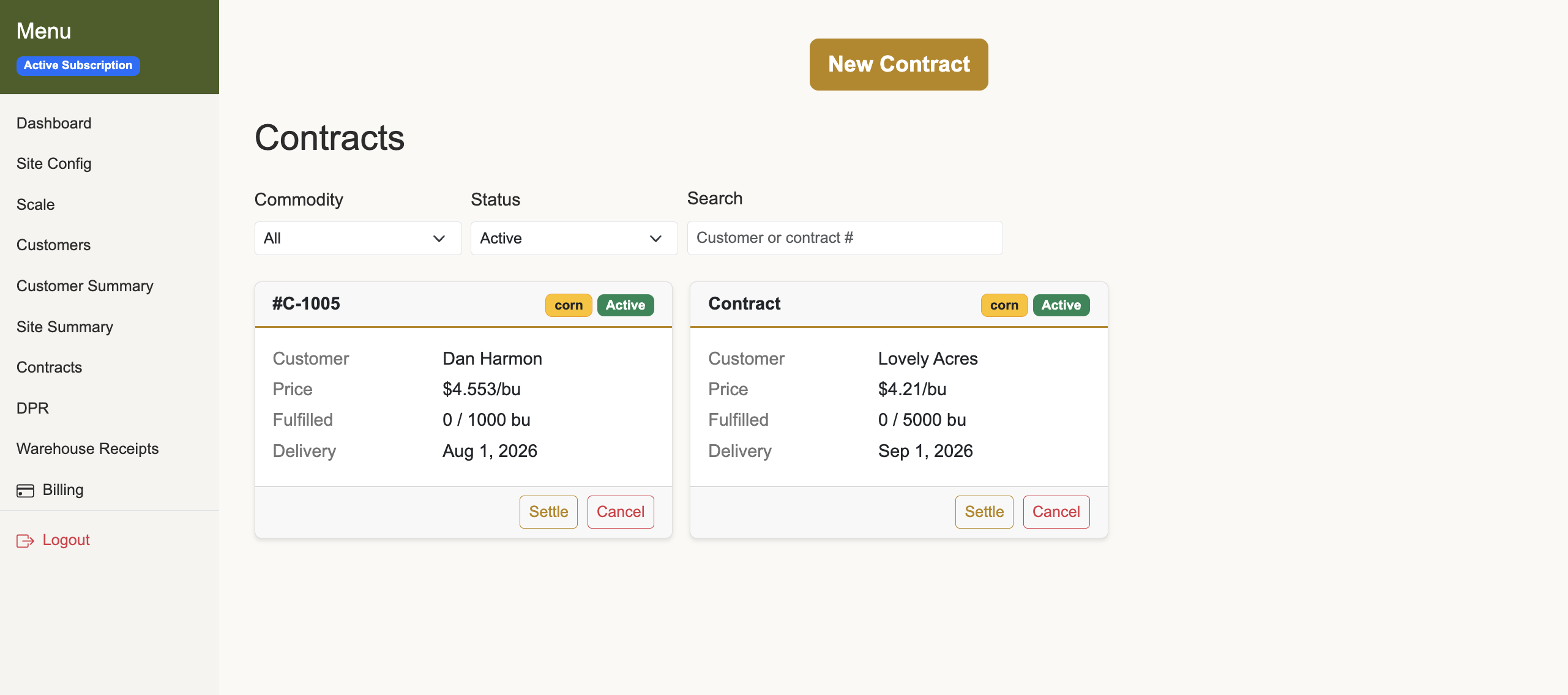
On the contracts screen, every open contract shows three numbers at a glance: contracted bu, fulfilled bu, and remaining. If a contract called for 20,000 bu and 17,400 have come in, it shows 17,400 fulfilled and 2,600 remaining. That number updates the next time a load is tagged to the contract.
The remaining bushel count is always calculated from actual delivery data — it cannot drift from the real number, because it is the real number.
The contract price stays with the contract — it does not need to be re-entered on each haul. That eliminates a whole class of pricing errors where a load accidentally prices at spot when it was supposed to go at contract. The grain goes to the right place at the right price, with the ticket trail to prove it.
Each contract moves through a defined lifecycle: open (created, not yet signed), active (on file and selectable on the delivery form), and settled (invoice generated and closed). Until a contract is activated, no loads can be tagged to it — an unsigned agreement cannot accidentally pull in tickets. Contracts can also be cancelled, with an optional reason recorded.
What the current version covers.
Horizon Grain's forward contract feature currently supports flat-price contracts. Settlement generates a customer invoice at the locked price per bushel. The farmer knows exactly what he is getting; the elevator carries the price risk from signing to settlement — both the futures move and the basis move — which is a trade most small operations make willingly in exchange for volume certainty.
Basis and HTA contracts are supported too — see basis and HTA contracts.
- Split deliveries and forward contracts are mutually exclusive for a given load — a delivery either tags against a specific contract (becoming elevator-owned site inventory) or stays in customer storage, not both.
- If a delivery was logged to the wrong contract, it can be corrected on open deliveries. The fulfilled bushel counts on both contracts update automatically.
- Outbound loads that ship before the settlement names the contract can be logged with no contract attached and applied later — see the haul that ships before the contract does.
- Cancellations can record a reason on the contract.
- Each contract is tied to a commodity and a site, so multi-site elevators track contracts separately per location.
How to use it: a quick walkthrough.
- Create the contract. Go to Contracts in the menu and add a new contract. Pick the customer, commodity, contracted bu, flat price per bu, and delivery window dates. Assign a contract number that matches your paper copy. The contract starts in "open" status.
- Activate the contract. Once the paper contract is signed and on file, activate it. Active contracts appear as selectable options on the delivery form — until you activate, it stays in "open" and no loads can be tagged to it.
- Tag loads against it as they come in. When the farmer starts hauling, enter each load as normal — gross weight, tare, moisture, any dockage. On the delivery form, tag the load to the forward contract instead of leaving it in customer storage. The contract's fulfilled count updates immediately.
- Check fulfillment whenever you need to. The contracts list shows contracted bu, fulfilled bu, and remaining at a glance. You can see mid-harvest where every contract stands without touching a spreadsheet.
- Settle when all the grain is in. Once the contract is full, settle it. Horizon Grain generates a customer invoice priced at the contracted flat price, applied against the actual dry bu received. The contract closes to "settled" status.
- Cancel if needed. If a contract falls through — farmer decides not to deliver, crop came up short — cancel it and note the reason. The history stays in the system.
That is it. No second spreadsheet to maintain. No counting back through a stack of scale tickets at settlement. The fulfillment number is always current because it comes directly from the ticket data.
Why this matters more at small elevators.
At a two- or three-person elevator, nobody is reconciling contracts daily — there is no buffer between an error and the moment it surfaces. When fulfillment tracking is manual, that moment is settlement, which is exactly the worst time to find it.
Tracking tied directly to the load tickets you are already entering closes that gap without adding workload.
Step by step: Forward contracts in the user guide.