Contracts never land on the number.
A farmer has a 2,600 bu flat-price soybean contract at $11.13 and a 5,000 bu contract at $12.14. The scale puts 2,760.723 bu on the first one. That is 160.723 bu over.
Until now, the extra was paid at the first contract’s price. Fine if that is what you both wanted. Not fine when the farmer meant it for the $12.14 contract, or wanted to hold it and sell later.
Three choices at settlement.
Click Settle on an over-delivered contract and the window asks what to do with the overage.
- Carry it to another contract. The list shows the farmer’s other open flat-price contracts for the same grain, with price and bushels left. Pick one and the bushels default to as many as it can take. Carry part or all of it. This contract pays the rest; the other contract counts the carried bushels as filled and pays them at its own price when it settles.
- Pay it here at this contract’s price. What always happened before.
- Move it to the farmer’s storage. The bushels go on the farmer’s balance as of the settlement date, and storage is charged from then. Sell them later like any stored grain. This option needs a Site Features switch, below.
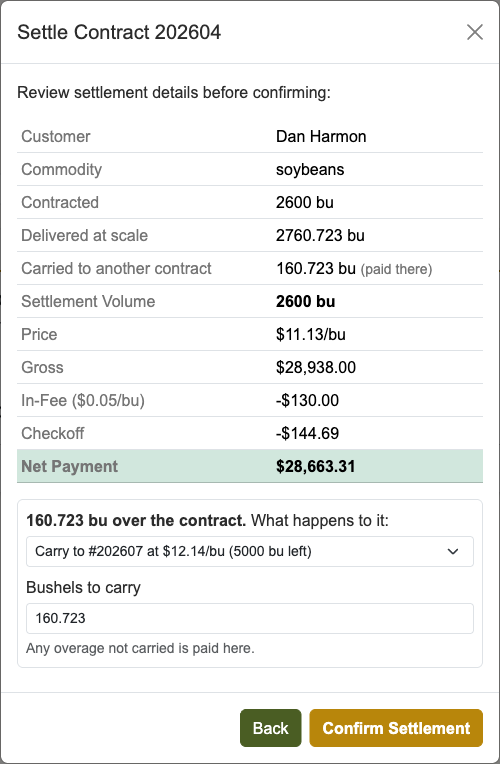
For our farmer: carry 160.723 bu to the 5,000 bu contract. The first contract pays 2,600 bu at $11.13 and closes. The second now reads 160.723 / 5,000 and will pay those bushels at $12.14.
The Site Features switch.
There is a new switch under Site Features on the Site Config page, Contract overage goes to storage. It is off unless you turn it on.
- Off: overage not carried is paid here at the contract price. Storage is not offered.
- On: storage is offered and pre-selected. You can still pick carry or pay-here on any settlement.
Turn it on if your elevator’s practice is that a contract pays its number and anything over waits in the bin. Leave it off if you pay what crossed the scale.
What the paperwork shows.
- The settlement sheet lists Carried to #202607 or Overage moved to storage with the bushels.
- The second contract’s settlement sheet lists Includes carried in from #202604.
- The farmer’s storage statement names the contract the stored bushels came from.
- The settled contract card reads 2,600 / 2,600, not 2,760 / 2,600.
At the scale.
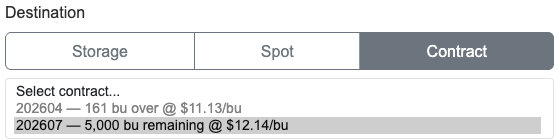
Once a contract is full, the Contract list on the delivery form still shows it, but greyed out and labelled with how far over it is. The next load goes to another contract or to storage. A load already on it stays put.
What it won’t do.
- Carry more than the other contract has left. The rest is paid here or stored.
- Carry to a basis or HTA contract. Flat-price only, same as applying from storage.
- Carry across farmers, grains, or crop years.
- Cancel a contract that has carried-in bushels. Settle it instead.
Why this matters.
The extra 160 bushels were always going to land somewhere. Now it is a choice you make once, on the settlement, and the sheets say what you chose.
Local scale-house computers get this in the latest update. If the storage option is missing, check the switch under Site Features in Site Config.
Related reading: apply stored grain to a forward contract and the forward contract problem no one talks about.
Step by step: When a contract comes in over in the user guide.