The grain went in the bin before the contract was signed.
A farmer has two flat-price soybean contracts, 2,600 bu and 5,000 bu. Some of the beans went into storage before the contracts were signed. The rest are still coming across the scale against them.
Until now, only loads weighed against a contract at the scale counted toward it. Grain in storage did not. The example below is soybeans, but it works the same for corn or any contracted grain.
The old workaround.
You sold the stored grain by hand at the contract price, then cancelled the contract. The problems:
- You typed the contract price and number yourself, and a typo meant a wrong check.
- Nothing tied the sale to the contract, so the contract card never showed those bushels as filled.
- With loads at the scale and sales from storage on one contract, it was easy to pay the same bushels twice or overfill it.
How it works.
Same farmer: about 6,000 bu of beans in storage and the 2,600 bu contract open.
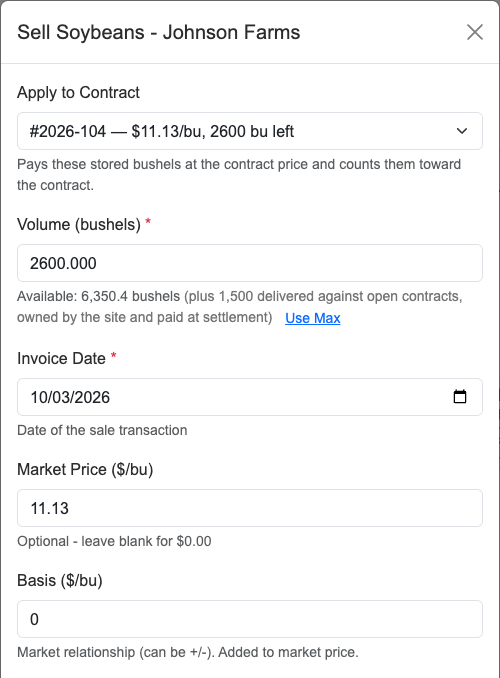
- Open the sale. On the Customer Balances page, click Sell Soybeans (or Sell Corn) on the farmer.
- Pick the contract. The Apply to Contract list at the top shows that farmer’s Active contracts for the grain, with price and bushels left. None (spot sale) is the default and works as it always has.
- Check what filled in. The contract price fills in and locks. For a flat-price contract basis is 0, because a flat price is all-in; a priced basis or HTA contract fills in its futures price and basis instead. The contract number fills in. Bushels default to what is left on the contract, or the farmer’s storage balance if that is smaller.
- Set the bushels. A partial sale is fine. Apply the rest later in more sales. For our farmer, it is the full 2,600.
- Finish the sale. It is paid like any sale from storage, with the same in-fee and checkoff. There is no minimum storage charge, because grain sold on a contract isn’t charged storage. The bushels come out of the farmer’s storage balance.
- Check the contract card. Fulfilled now reads 2,600 / 2,600. It counts loads weighed against the contract plus grain applied from storage. The dashboard and Contracted In use the same total.
Scale loads and storage on one contract.
Say the 5,000 bu contract has 1,500 bu weighed at the scale and 3,500 bu applied from storage. Keep weighing loads against it, and top it up from storage with the steps above.
When you click Settle, the window shows two rows: Delivered at scale, and Applied from storage (paid on those sales). Settlement pays only the scale bushels, so nothing is paid twice.
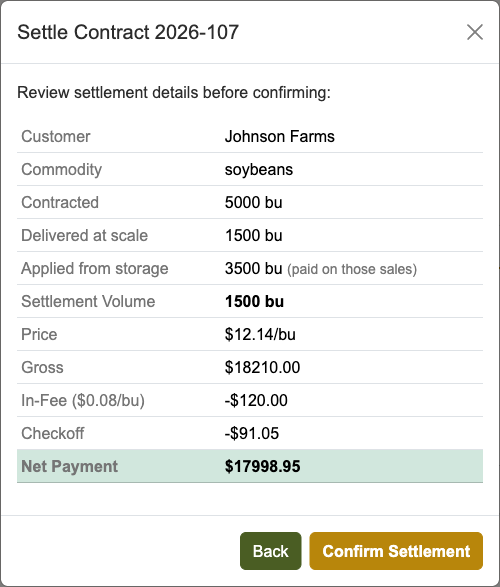
If every bushel came from storage, the button reads Close Contract. It closes the contract with no new invoice, because the farmer was already paid on those sales.
What it won’t do.
- Apply more than what is left. The extra stays in storage or goes on a separate spot sale.
- Take an unpriced basis or hedge-to-arrive (HTA) contract. It shows greyed out with the part still to set. Price it on the contract card first; then it takes stored grain like a flat-price contract.
- Use a contract that is not Active. Same rule as for scale loads.
- Cancel a contract once grain is applied. Settle it instead.
- Overfill on an edit. If you edit a sale applied to a contract, it is capped at what is left on that contract.
Why this matters.
Contracts rarely fill the way the paper says. Some grain goes to storage, some crosses the scale after the signature. The contract card should count all of it, and each bushel should be paid once.
Local scale-house computers get this in the latest update. If the Apply to Contract list is empty for a farmer, check that the contract is Active and priced.
Related reading: the forward contract problem no one talks about and basis and HTA contracts, the price that gets set later.
Step by step: Apply stored grain to a contract in the user guide.