The whiteboard that runs the books.
Most country elevators in the 50,000 to 500,000 bushel range track hauler payables on a whiteboard, in a spiral notebook, or in a shared Excel file that one person owns. For a hauler running 30–50 loads in a pay cycle, that reconciliation runs 1 to 2 hours per cycle — and you do it again the next cycle.
Missed loads are common. The rate was $0.10 in September and $0.14 by November — now someone has to sort which loads went at which rate. The whiteboard does not remember.
Why this problem is harder than it looks.
The accounting challenge has a few distinct failure modes:
- Rate changes reopen settled loads. The rate on the ticket is what the trucker understood he was getting paid — change it retroactively and you have a dispute.
- Per-load invoicing creates paperwork nobody wants. A trucker moving corn from your elevator to Marshfield Grain or ADM Richland Center might make 10 to 15 hauls in a week. Cutting an invoice for each one is impractical. But monthly rollups stretch cash flow and create reconciliation headaches at the end of a long cycle.
- Loads get missed. A ticket gets set aside. The person updating the spreadsheet was out for two days. The trucker's count does not match yours. Now you are reconciling by phone while harvest is still running.
Weekly or bi-weekly accumulation matches how trucking companies invoice — "I'll pay you for everything through Friday."
How Horizon Grain handles trucker settlement.
Trucker management starts in Site Config, under the Truckers tab. Add each trucking company once — name, contact info, notes. Rate offerings are managed separately via the Rates button on the trucker card.
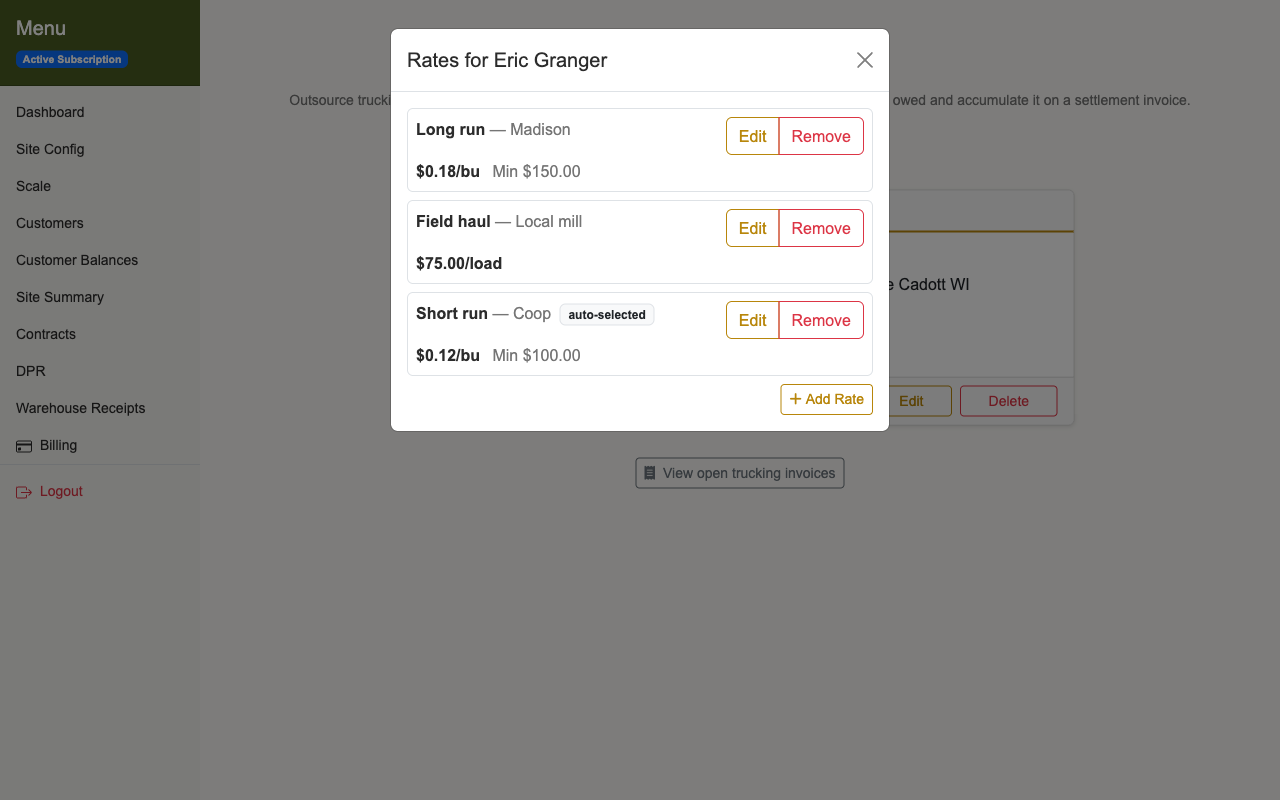
A trucker can have one rate or several. A common setup: $0.12/bu short-haul to the local Coop, $0.18/bu long-haul to Madison, each with an optional minimum charge ("come out for at least $100").
When you log a haul, pick the trucker and the rate dropdown shows their offerings — most recently added is selected by default. Pick a different offering, or switch to "Custom override" for a one-off rate. Horizon Grain snapshots the rate at that moment. If you edit a rate offering next month, loads already logged stay at the rate they were agreed to — the same way a paper weight ticket works.
Rate edits never overwrite. Old loads keep pointing at the rate they were agreed to. Change a rate today and last week's hauls are untouched.
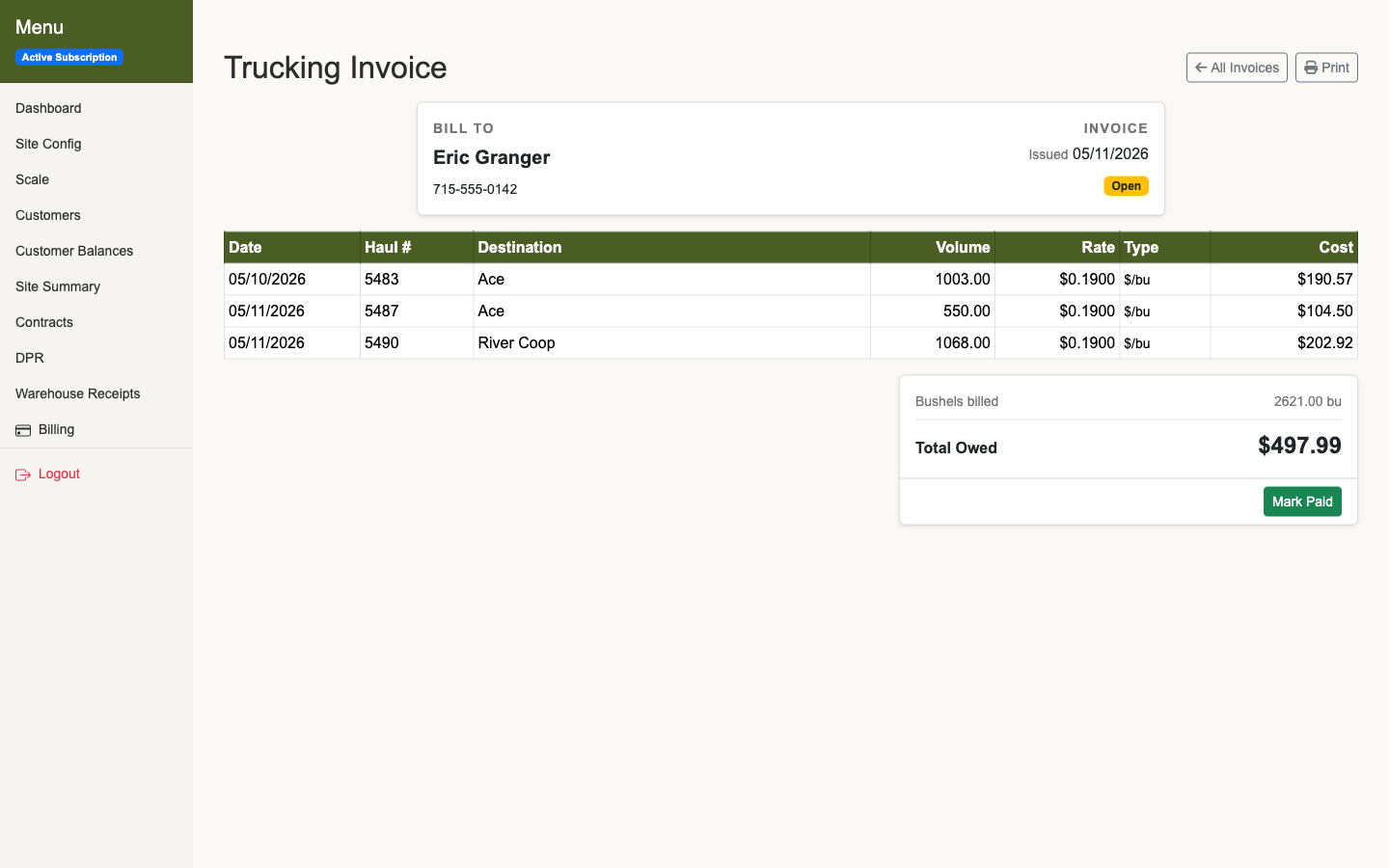
There is one open settlement invoice per trucker. Every haul adds to the running total. When you are ready to pay — weekly, bi-weekly, whatever your cycle — mark it paid. It closes. The next haul opens a fresh one automatically.
Paid invoices lock. If a load on a closed invoice needs to be corrected, you unmark the invoice paid first. That protects the record without making corrections impossible.
The settlement invoice.
The settlement invoice lists each haul: destination, bushels, rate, and cost. Total at the bottom. Clean layout that prints directly from the browser — the same format you hand the trucker or keep for your records.
Destination autocomplete pulls from previously-used destinations, and defaults to the sold-bushel buyer's name on the first haul to a new buyer. Type "Mar" and the matching destinations drop down — pick Marshfield Grain instead of retyping the whole name.
How to use it: a quick walkthrough.
- Add your truckers. Site Config → Truckers → add each trucking company with their contact info.
- Set their rate offerings. Click Rates on the trucker card. Add one rate or several — per destination, per haul length, per-bushel or per-load, with optional minimum charges.
- Log a haul. Add Haul, pick the trucker. The most recent rate offering is selected automatically; switch to another or to a custom rate as needed.
- Watch the invoice accumulate. Every haul adds to the open invoice. The running total is always current — no manual addition, no spreadsheet to maintain.
- Settle with the trucker. Print the settlement invoice — every haul, the locked rate, the total owed. Hand it to the trucker or keep it for your records. Mark it paid. It closes. The next haul opens a fresh one automatically.
Why this matters at small elevators.
At a two- or three-person elevator, the person running the scale is often the same one reconciling hauler payables, updating the whiteboard, and answering the phone. Payables never get their own desk or their own hour of the day — they get whatever is left after the trucks stop.
Settling with the trucker should take as long as it takes to print a page and write a check — not an afternoon pulling tickets.
Step by step: Trucker settlement in the user guide.